> For the complete documentation index, see [llms.txt](https://survey.fmpx.docs.frox-it.de/llms.txt). Markdown versions of documentation pages are available by appending `.md` to page URLs; this page is available as [Markdown](https://survey.fmpx.docs.frox-it.de/messen-mit-totalstation/dialog-messprogramm-stationierung.md).
# Dialog Messprogramm - Stationierung
*Menü Tachymeter / Instrumentpanel*
Modul **M-FX Tachymeter Steuerung**
Allgemeine Funktionen zur Verwendung des Instrumentpanel findem Sie im Kapitel [Instrumentpanel](/messen-mit-totalstation/instrumentpanel.md).
Nachdem das Instrumentpanel gestartet ist, wird die Bedienoberfläche der Tachymeter Steuerung sichtbar. Sie befinden sich zunächst im Dialog Messprogramm. Der Dialogname wird jeweils am linken Rand des Instrumentpanel in einem blauen Balken angezeigt.
## Dialog Messprogramm
Im Dialog Messprogramm stehen die Stationierungsverfahren [Bekannte Stationierung](/messen-mit-totalstation/dialog-messprogramm-stationierung/bekannte-stationierung.md) und die [Freie Stationierung](/messen-mit-totalstation/dialog-messprogramm-stationierung/freie-stationierung-freie-standpunktwahl.md) zur Verfügung. In Projekten, die mit einem lokalen Koordinatensystem angelegt wurden, steht Ihnen außerdem eine verkürzte [Lokale Stationierung](/messen-mit-totalstation/dialog-messprogramm-stationierung/lokale-stationierung.md) zur Verfügung. Über [Wiedeaufnahme (Kopie)](/messen-mit-totalstation/dialog-messprogramm-stationierung/wiederaufnahme-kopie.md) können Sie eine bereits vorhandene Station fortführen.

## Messprogramm auswählen
Im Hauptdialog legen Sie nun als erstes das Stationierungsverfahren fest oder Sie klicken auf *Wiederaufnahme (Kopie)*, um einen Standpunkt erneut zu bearbeiten, der zuvor beendet wurde. Im Falle der Wiederaufnahme wird der Chronologie des Messablaufs entsprechend ein neuer Stapelansatz angelegt, indem sich alle Anschlüsse befinden, die zuvor auf dem Standpunkt gemessen wurden. Ansonsten ist dieser Stapelansatz leer.
## Arbeitsweise innerhalb eines Messprogramms
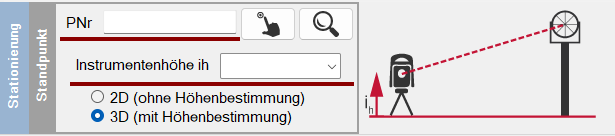
Wenn Sie ein Messprogramm ausgewählt haben, dann führt Sie das Instrumentpanel Schritt für Schritt durch die Stationierung. Ihnen wird mit einer roten Linie angezeigt, wo Sie noch Eingaben tätigen müssen.
Sind in einem Schritt alle Eingaben getätigt, dann können Sie über die Pfeil-Buttons am rechten Bildschirmrand zum nächsten Schritt gehen (Prinzip einer Karteikartenrolle – immer einen Schritt weiter).
Das Panel arbeitet workfloworientiert und unterstützt somit auch nicht erfahrene Anwender bestmöglich.
---
# Agent Instructions
This documentation is published with GitBook. GitBook is the documentation platform designed so that both humans and AI agents can read, navigate, and reason over technical content effectively. Learn more at gitbook.com.
## Querying This Documentation
If you need additional information that is not directly available in this page, you can query the documentation dynamically by asking a question.
Perform an HTTP GET request on the current page URL with the `ask` query parameter, and the optional `goal` query parameter:
```
GET https://survey.fmpx.docs.frox-it.de/messen-mit-totalstation/dialog-messprogramm-stationierung.md?ask=&goal=
```
`ask` is the immediate question: it should be specific, self-contained, and written in natural language.
`goal` is optional and describes the broader end goal you are ultimately trying to accomplish on behalf of the user. GitBook uses it to tailor the answer towards what is most useful for that goal.
The response will contain a direct answer to the question and relevant excerpts and sources from the documentation.
Use this mechanism when the answer is not explicitly present in the current page, you need clarification or additional context, or you want to retrieve related documentation sections.