> For the complete documentation index, see [llms.txt](https://survey.fmpx.docs.frox-it.de/llms.txt). Markdown versions of documentation pages are available by appending `.md` to page URLs; this page is available as [Markdown](https://survey.fmpx.docs.frox-it.de/messen-mit-totalstation/messung/absteckung/absteckung-von-punkten.md).
# Absteckung von Punkten
*Menü Tachymeter / Instrumentpanel*
Modul **M-FX Tachymeter Steuerung**
**Instrumentpanel - Dialog Messungstyp - Absteckung**

## Absteckungsprofil auswählen
Mit FX Survey können Sie Punkte und gerade Achsen abstecken. Bevor die Absteckung durchgeführt werden kann, ist festzulegen, in welcher Art und Genauigkeit die Absteckung erfolgen soll. Hierzu ist ein Absteckungsprofil auszuwählen:

Absteckungsprofile können im Menü Extras / Programmeinstellungen / Tachymeter definiert werden. Lesen Sie dazu auch das Kapiel [Absteckungsprofile definieren](https://survey.fmpx.docs.frox-it.de/messen-mit-totalstation/messung/absteckung/absteckungsprofile-definieren.md).
Nach Auswahl des Profils werden die Einstellungen des Profils angezeigt:

In diesem Beispiel sollen Punkte mit einer Lagegenauigkeit von 0,03 m abgesteckt werden. Nach der Lageabsteckung eines Punktes soll automatisch auch dessen Höhe in einem gesonderten Messvorgang abgesteckt werden, ebenfalls mit einer Genauigkeit von 0,03 m.

Mit dem Pfeil nach unten auf der rechten Seite des Panels gelangt man zum nächsten Schritt. Um die Absteckung bereits hier abzubrechen, klickt man den Pfeil nach oben oder die Schaltfläche "Abst. abbrechen". Beide Varianten führen wieder in das Panel Messungstyp zurück.
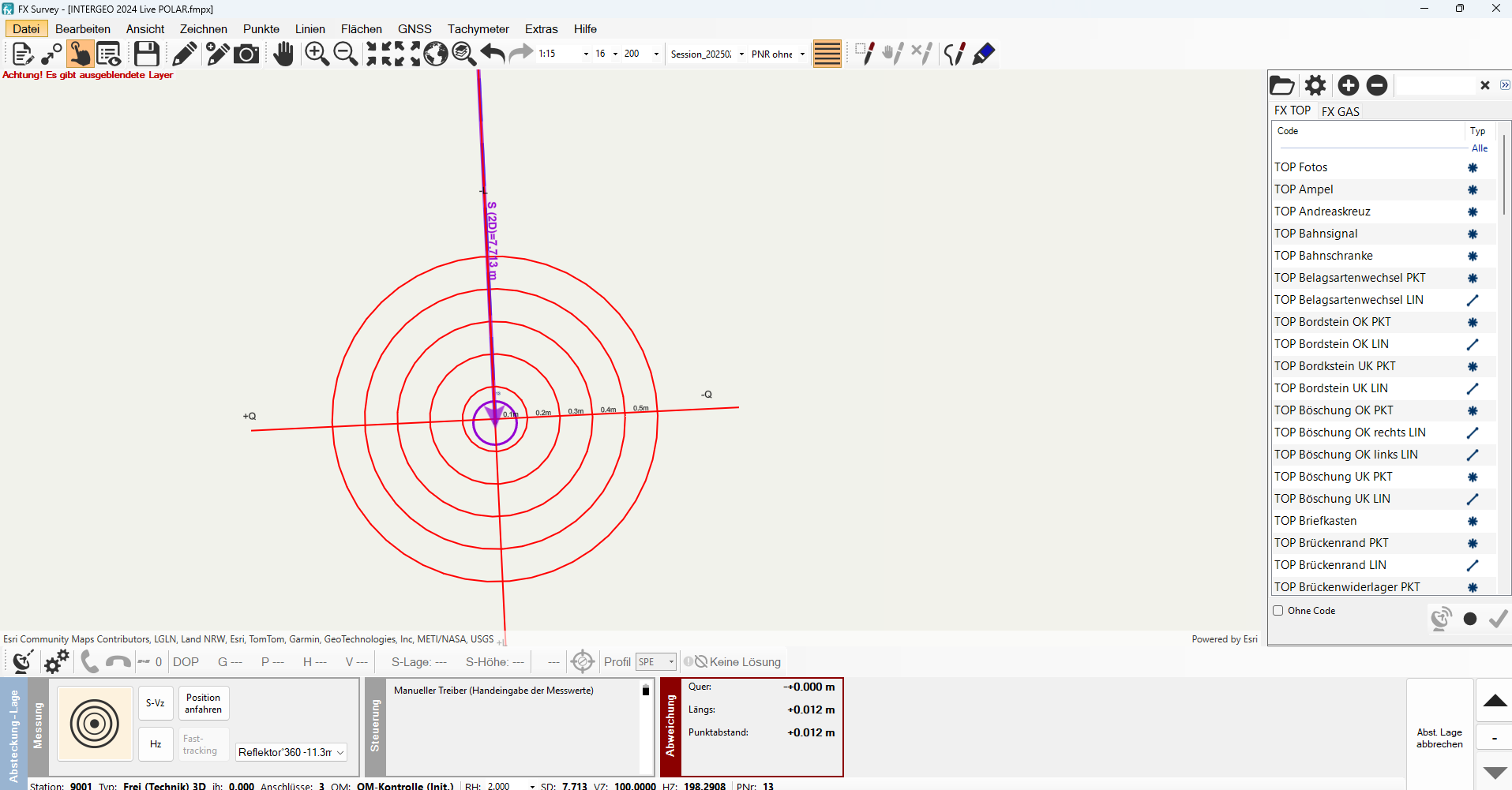
## Absteckung
*Bitte beachten:*
*Die Funktion HZ,VZ,SD aktuell darf bei Punkt -und Achsabsteckungen nicht aktiviert sein, da man ansonsten durch die permanente Lieferung von Werten nie in den grünen Bereich bei den Abweichungen kommt.*
## Anzeige der Reflektorposition
Das Schnell-Tracking kann zur Anzeige der Reflektorposition genutzt werden. Der Reflektor muss sich im Lock befinden (Verfolgung des Reflektors). Anschließend klicken Sie auf Schnell-Tracking. Die Reflektorposition wird mit einem grünen Kreuz angezeigt.
## Ziellinie einblenden
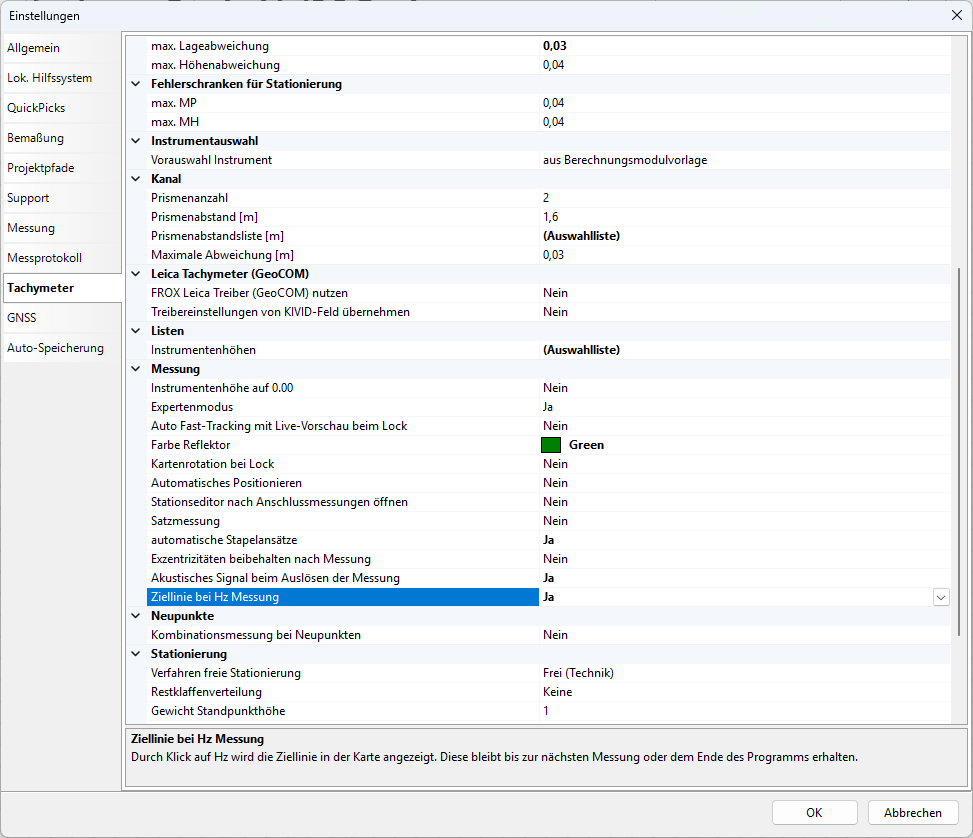
Wenn Sie im Menü Extras / Programmeinstellungen / Tachymeter / Messung unter "Ziellinie bei Hz Messung" ein Ja setzen, wird durch Klick auf Hz (neben dem Messbutton) eine Ziellinie, welche die Blickrichtung des Tachymeters darstellt, angezeigt. Diese bleibt bis zur nächsten Messung oder dem Ende des Programms erhalten.
---
# Agent Instructions
This documentation is published with GitBook. GitBook is the documentation platform designed so that both humans and AI agents can read, navigate, and reason over technical content effectively. Learn more at gitbook.com.
## Querying This Documentation
If you need additional information that is not directly available in this page, you can query the documentation by asking a question.
Perform an HTTP GET request on the following URL with the `ask` and `goal` query parameters:
```
GET https://survey.fmpx.docs.frox-it.de/messen-mit-totalstation/messung/absteckung/absteckung-von-punkten.md?ask=&goal=
```
`ask` is the immediate question: it should be specific, self-contained, and written in natural language.
`goal` is what the user is ultimately trying to achieve, the reason they need the answer. Sharing it helps GitBook give you a better, more relevant answer. A goal is most helpful when it describes the outcome the user wants rather than restating the question. For example, with `ask=how do I create an API token`, a goal like `automate deployments from our CI pipeline` lets GitBook tailor the answer to that use case.
The response will contain a direct answer to the question and relevant excerpts and sources from the documentation.
Use this mechanism when the answer is not explicitly present in the current page, you need clarification or additional context, or you want to retrieve related documentation sections.