> For the complete documentation index, see [llms.txt](https://survey.fmpx.docs.frox-it.de/llms.txt). Markdown versions of documentation pages are available by appending `.md` to page URLs; this page is available as [Markdown](https://survey.fmpx.docs.frox-it.de/messen-mit-totalstation/exkurs-leica-totalstation/edm-messprogramm-powersearch-filter.md).
# EDM Messprogramm / Powersearch Filter
**GEOCOM Treiber von Leica Geosystems**
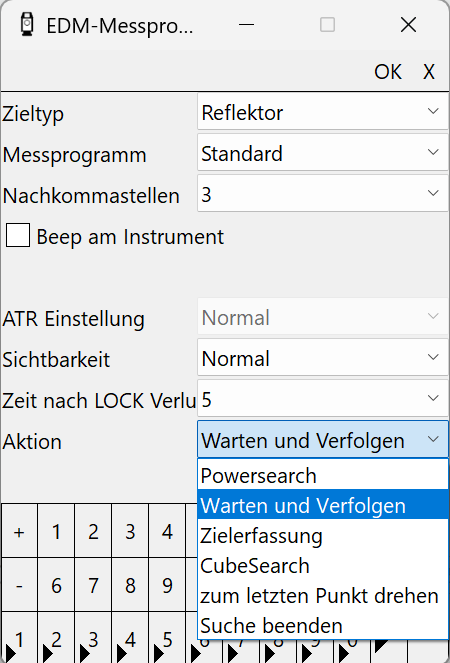
*Menü Gerät / Einstellungen / EDM-Messprogramm EDM (Electronic Distance Measurement)*
### Zieltyp
Auswahl möglich zwischen Reflektor und Reflektorlos.
## Messprogramm
Bei Auswahl "Standard schnell" erfolgt die Messung schneller. Die Einstellungen "Standard lang" für lange Strecken und "Präzise" eine sehr präzise Messung berücksichtigen zusätzliche Parameter, die Messung dauert aber länger. Üblicherweise wird hier die Einstellung "Standard schnell" gewählt.
Wurde beim Zieltyp
### Sichtbarkeit
Bei schlechten Wetterbedingungen oder bei schlecht reflektierenden Oberflächen empfiehlt sich die Einstellung \. Die Messung erfolgt dann auch bei schlechten Bedingungen.
###
## Was tun bei LOCK Verlust
### Zeit nach LOCK Verlust
Gibt an, nach wie vielen Sekunden eine Aktion ausgeführt werden soll.
### Aktion
Hier kann ausgewählt werden welche Aktion ausgeführt wird, wenn die eingebene Zeitspanne nach dem LOCK Verlust vorüber ist. Die Standardeinstellung ist Powersearch. Dies bedeutet, dass nach einem LOCK Verlust immer ein Powersearch erfolgt, was relativ viel Zeit kosten kann. Wir empfehlen daher immer die Enstellung "Warten und Verfolgen". Bei LOCK Verlust wird dann das Prisma direkt wieder in LOCK genommen, sobald die Sicht auf das Prisma wieder frei ist.
---
# Agent Instructions
This documentation is published with GitBook. GitBook is the documentation platform designed so that both humans and AI agents can read, navigate, and reason over technical content effectively. Learn more at gitbook.com.
## Querying This Documentation
If you need additional information that is not directly available in this page, you can query the documentation by asking a question.
Perform an HTTP GET request on the following URL with the `ask` and `goal` query parameters:
```
GET https://survey.fmpx.docs.frox-it.de/messen-mit-totalstation/exkurs-leica-totalstation/edm-messprogramm-powersearch-filter.md?ask=&goal=
```
`ask` is the immediate question: it should be specific, self-contained, and written in natural language.
`goal` is what the user is ultimately trying to achieve, the reason they need the answer. Sharing it helps GitBook give you a better, more relevant answer. A goal is most helpful when it describes the outcome the user wants rather than restating the question. For example, with `ask=how do I create an API token`, a goal like `automate deployments from our CI pipeline` lets GitBook tailor the answer to that use case.
The response will contain a direct answer to the question and relevant excerpts and sources from the documentation.
Use this mechanism when the answer is not explicitly present in the current page, you need clarification or additional context, or you want to retrieve related documentation sections.


